Friday, October 1, 2010

Servo Hacking and Wireless Developments

It's been a while since my last post; I'm getting my money's worth out of school I suppose. Despite all the work I've managed to make slow and steady progress on my latest project. Here's what:

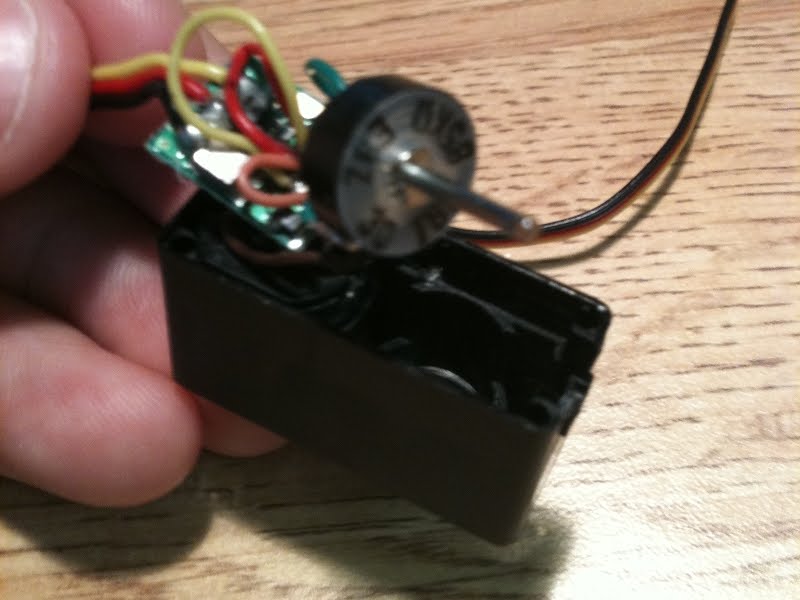
Firstly, I ordered a pair of Hitec HS-81 micro servos which truly are micro at a whopping 1.2"x0.47"x1.2". Naturally I had to pry them open and have a look around the insides. The idea is to convert them to continuous motion so they can eventually drive some gears. Here were the obstacles in doing that:

Little plastic mechanical stop in the gear case.

No Problem.

Potentiometer.

Tricked the servo with a couple resistors, no sweat.*

*Except I chipped a tooth.

Now, because these servos are so small the shaft of the potentiometer is actually used to align some of the gears and I couldn't just get rid of the pot altogether. Instead I filled it with hot glue so that it couldn't rotate (not sure why since I cut the wires from it), put it back in place, and reconnected it to the gears. Unfortunately, the end of the shaft is keyed to fit into the spline gear. I cut out the excess material in the gear to assure that the shaft could rotate freely, but at this small scale that is not easy and when I went to test it the gear still caught on the pot, locked up, and broke a tooth.

Lesson learned: drill out the gear the right way, not with a pocket knife. Also I'm going to order these servos' big brother the Hitec HS-82MG, for the final product which features metal gears for about $4 more.

With one servo left I could still test out the XBee radios. The basic concept of this project is to control an Arduino with an iPhone over wifi, and then over radio with XBees. In the previous post I determined I could make it from A to B, so now it was time to test from B to C. To do this I got a breakout board and an explorer board and crammed them onto a breadboard like so:

Nothing too tricky here other than a voltage divider circuit with a few resistors to bring down the Arduino's 5V output to the 3.3V that the XBee module runs on (Thanks Shane!). It's also important to note that thou shalt remove the radio while programming. I don't exactly know why this is yet, but it's going to throw an uploading error at you if you don't.


It works! In fact, I also got A to B to C working, but couldn't record it since I use my iPhone camera for video. Maybe I could have figured something out...with mirrors? For now you'll have to take my word that it works. It was actually surprising how easy these radios are to implement. You have to make sure the baud rate of the Arduino is the same as the XBees, but that's the only change I made to the existing test code. Next step is to refine this crazy control sequence and start speed control testing, hopefully with some working continuous motion servos.

Friday, September 3, 2010

New Project Trailer

I picked up an iPhone 3Gs a week ago and have already taught it some tricks courtesy of the wonderful touchOSC app. Accompanied by the OSC editor freeware, this program allows you to create your own GUI for the iPhone/iPad (I think they have an Android version too?) for controlling all your musical or embedded electronics projects. Yes, it's $4.99 but in my opinion it's well worth the price of admission. In fact, it's the only app I have justified paying for so far.

After playing with my toys for a bit I finally found reason enough to invest in some very small servos to join the Arduino Nano 3.0 and XBees sitting on my desk. And so begins the next project:


No sound I guess...

There is a great guide on SparkFun for syncing OSC over wifi, to Processing, to an Arduino via USB. After tweaking the code - originally intended to control an LED - a little bit the iPhone can control ardWINDo's servo. I won't spill the details now, but I will say that my next project will be mobile. Watch-winder's are cool and all but only watches can ride them...

Monday, August 9, 2010

ardWINDo: Load the Code

In case you're interested here's the code. I'm still working on the schematic but it will be posted soon!

Sunday, August 1, 2010

ardWINDo: v1.0

The goal of ardWINDo was to create an inexpensive, compact, and elegant Arduino-driven watch winder. No in all seriousness this project just my excuse to get into microcontrollers. I mean, big deal I got a second watch it's not that hard to shake the old one a few times over the weekend. I'm happy I did it though and if you were to add up the time it would take me to wind my watch every week I doubt it would ever approach the amount of time it took to construct ardWINDo.

Shown with it's prey

In my last post I had the guts layed out. Arguably the final product still looks like the guts, only screwed to a bent and burnt piece of polycarbonate. There were some intermediate steps though. The main task was to transfer the electronics from a breadboard to a prototyping board. This was challenging given the spacial constraints but I hid the messy soldering on the back of the board. The result works quite well. My only self-criticism is not going all out and making a legit shield...maybe v1.2 or v2.0 (how does the nomenclature work?).

Clean enough

There was also the problem of scratch-protecting and constraining the watch. My solution involved felt, velcro, and a bit of sewing. Most commercially available watch-winders use a pillow and cup interface, displaying the face of the watch through a window. Personally though, I think it's more interesting to watch the gears and rotating mass on an automatic watch. That's what you see with the current interface but maybe I will make one that displays the face with the spare bracket.


The software only needed minor edits since my previous post. The winding is decently precise but I haven't given up making it a perfect match. I have been hinting considerably through this post at a revised version of ardWINDo and by then I will have a better handle on the coding. For now the code is simple, potentially inefficient, but functional. Also, I have yet to hear of a watch that explodes if it's wound 1.374 too many times.

This brings up an important point about watches though: there is such a thing as over-winding! The mainspring is designed to hold only so much potential energy and will break if too much force is applied. For Seiko Kinetic watches which store energy in a capacitor, this is not so much a concern. Still it's a good idea to consult the manufacturer's instructions to determine how many winds to order up. Anyways, without further digression, here is ardWINDo v1.0. Enjoy:

Wiring shematic and full code to come soon.

Tuesday, July 27, 2010

ardWINDo: Update

The stand was anticipated to be the most painless piece of this project. Except, it's 0.22" polycarbonate and from the moment I unchecked the "bullet-resistant" box on the McMaster order I should have known it would be trouble. I thought it would be smelly to cut on the laser but I didn't anticipate it would catch fire. Or that it would be so hard to bend into shape. Functionally though, it works and I will use it. Hey, after going at it with a dremel and sandpaper it doesn't look half bad, Mike (Thanks for the laser time!):


With the mechanical end of things resolved I had some time to play with the electronics and software. The circuit is done and in the process of being transfered to a thinner prototyping board. A lot of careful planning is needed here because the 7-segment display takes up a lot of room. Other than that about the trickiest thing is the Red/Green LED. Maybe I'll post a schematic when it's all done.

As for the code, it does its job; it winds a watch as many times as you like. However, the current control structure for winding is imprecise. I'm not using one of the ATMEGA328 timers or even an external one. I simply use a for loop that decrements the winds and controls the servo per a delay calculated as the time it takes for the servo to complete one revolution. However, each cycle propagates a minute error when switching the servo from go (1400ms) to stop (1500ms). Not the end of the world but I'm going to synchronize the servo and display as well as the Arduino allows. Here's what it does so far:

High-pitched "PIZZAAAA" sound effect courtesy of Shane

Cost Update: $70.....

Monday, July 19, 2010

Axial Differential: Assembled

Looks like Shane beat me to it but here goes anyways...

The transformation from a live axle to a split one is a serious commitment. If one piddly gear is misaligned then all of the gears are misaligned. Nevertheless, with the bearing supports from the waterjet in and with the taste of finally driving the kart in our mouths, it was time to assemble the diff:

Does Ferrari lay out there parts with this level of OCD?

Through recklessless machining meticulous planning and attention to detail (Shane, I wrote this before yours and didn't get around to posting...not my fault that we write similarly), the diff went together seamlessly. The first hub was bored so that the 1/2" holes for the idle gear rods would be a couple thousandths greater in diameter than those of the second. This high tolerance is compensated for by the countersunk screws that hold the rods in place. Those rods were also hydraulically pressed into one hub and are not going anywhere soon. Here she is assembled:


There were a few last minute additions to keep the beast together; thrust bearings prevent friction between the aluminum hub and steel gears, and retaining clips keep the gears on the shaft. The bearings pressed into the hubs do not provide lateral support to the output shafts. However, the kart frame has bearings with set screws built in which will absorb all of the load. Shane didn't show you this:


Even dry, the output shafts spin with minimal resistance, which can be attributed to the - robust - weight of this thing. Similar shout-out to Charles for the concept. Stay tuned to see how it holds up once we begin road testing!

Monday, July 12, 2010

ardWINDo: Testing Arduino

I finally got a chance to mess around with the Arduino and test some sample code. Results:


Success. There wasn't much to be done but it's best to start from the very beginning. I will work on the actual coding soon but more critical at them moment is the mechanical end of things (SolidWorks license expires in 10 days!). As shown in the video above, the watch will be housed in an aluminum servo bracket...like those used in servo tilt-pans. It was $13 for two plus bearings and hardware, but that's a bargain when considering the time and money to make your own (as nicely).

The pursuit of simplicity has also inspired me to design a more elegant stand. The final product is going to be transparent, probably acrylic or polycarbonate. Fortunately I have a friend with a laser who can supposedly cut up to 1/4". Maybe I'm cheating a little on the pricing through this connection, but it's nothing that couldn't have been done with a drill and a dremel. Should look something like this:

Much Better. And the brick is a dummy Arduino-sized block.
Cost Update: $59.85